



0068. AMD
1. 🎯 本节内容
- AMD 模块化规范
2. 🫧 评价
AMD 可以说几乎完全退出历史舞台了,很少场景会使用到它,简单了解一下它的导入导出写法,能读懂程序即可。
3. 🤔 AMD 是什么?
3.1. AMD
AMD(Asynchronous Module Definition)是一种异步模块定义规范,专为浏览器环境设计。
- 异步加载模块及其依赖,不阻塞浏览器渲染
- 依赖前置,在定义模块时必须声明所有依赖
- 并行下载所有依赖,加载完成后执行模块回调
- 代表实现:RequireJS
- 目前(2025)主流规范是 ES Module 和 CommonJS,AMD 已基本退出历史舞台,简单了解即可。
3.2. 基本用法
引入 RequireJS:
html
<script data-main="./index.js" src="./require.js"></script>data-main:入口文件路径- RequireJS 读取该属性值,动态创建
script标签并插入页面 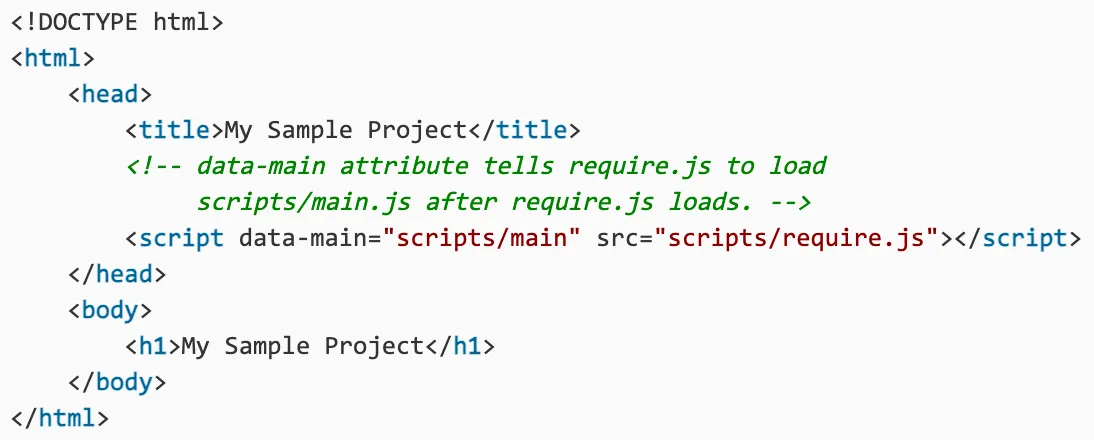
- RequireJS 读取该属性值,动态创建
src:RequireJS 库文件路径- 下载地址:require.js download
定义模块:
js
// AMD 标准写法
define([依赖的模块列表], function (模块名称列表) {
  // 导入:
  // 等待依赖加载完成后,执行回调函数
  // 依赖模块的导出内容作为函数参数传入

  // …… 模块内部代码

  // 导出:
  return 导出的内容
})

// 类 CommonJS 写法(RequireJS 扩展支持)
define(function (require, exports, module) {
  module.exports = 导出的内容
  // 这种写法方便 CommonJS 开发者迁移
})RequireJS 除了实现 AMD 规范,还兼容部分 CommonJS 风格写法(称为 Simplified CommonJS Wrapping),降低开发者迁移成本。
4. 💻 demos.1 - 计算两数相乘
这一部分,将通过一个简单的「计算两数相乘」的小 demo 来了解一下 AMD 规范的导入、导出写法。
通过笔记中记录的这些 demos 的写法,你会发现 RequireJS 是非常灵活的,它兼容了多种模块导入、导出的写法。
不过 AMD 现在已经基本用不到了,就如前面提到的,它基本已经退出历史舞台了,快速过一遍 demos 就行,万一在某些项目中看到它的身影,要求能够读懂程序即可。
4.1. demos 需求
- 将两数相乘的逻辑封装到一个模块中
- 通过 amd 规范来引入模块并使用
功能其实非常简单,下面将通过多种等效的写法来认识 AMD 规范的语法。
4.2. 💻 demos.1.1 - AMD 经典写法
html
<!-- ./1.html -->
<!DOCTYPE html>
<html lang="en">
  <head>
    <meta charset="UTF-8" />
    <meta name="viewport" content="width=device-width, initial-scale=1.0" />
    <title>AMD test</title>
  </head>
  <body>
    <!-- 引入依赖文件 -->
    <script src="../common/require.js"></script>
    <script>
      // 加载模块
      require(['./1.js'], function (obj) {
        // 模块的导出内容会注入到函数参数中
        alert(obj.multiply(10, 20)) // 200
      })
    </script>
  </body>
</html>js
// ./1.js
define(function () {
  let multiply = function (x, y) {
    return x * y
  }

  // return 的内容即为导出的内容
  return {
    multiply,
  }
})4.3. 💻 demos.1.2 - 可以通过 data-main 来指定入口
html
<!-- ./1.html -->
<!DOCTYPE html>
<html lang="en">
  <head>
    <meta charset="UTF-8" />
    <meta name="viewport" content="width=device-width, initial-scale=1.0" />
    <title>AMD test</title>
  </head>
  <body>
    <!-- 引入依赖文件 -->
    <script data-main="./main.js" src="../common/require.js"></script>
  </body>
</html>js
// ./1.js
define(function () {
  let multiply = function (x, y) {
    return x * y;
  };

  // return 的内容即为导出的内容
  return {
    multiply,
  };
});js
// ./main.js
// 加载模块
require(['./1.js'], function (obj) {
  // 模块的导出内容会注入到函数参数中
  alert(obj.multiply(10, 20)) // 200
})4.4. 💻 demos.1.3 - 注意模块的相对路径问题
html
<!-- ./1.html -->
<!DOCTYPE html>
<html lang="en">
  <head>
    <meta charset="UTF-8" />
    <meta name="viewport" content="width=device-width, initial-scale=1.0" />
    <title>AMD test</title>
  </head>
  <body>
    <!-- 引入依赖文件 -->
    <script data-main="./scripts/main.js" src="../common/require.js"></script>
  </body>
</html>js
// ./scripts/1.js
define(function () {
  let multiply = function (x, y) {
    return x * y
  }

  // return 的内容即为导出的内容
  return {
    multiply,
  }
})js
// ./scripts/main.js
// 加载模块
require(['./scripts/1.js'], function (obj) {
  // 注意模块路径的写法,写成 './1.js' 是错误的
  // 模块的导出内容会注入到函数参数中
  alert(obj.multiply(10, 20)) // 200
})4.5. 💻 demos.1.4 - 模块路径的简写形式
html
<!-- ./1.html -->
<!DOCTYPE html>
<html lang="en">
  <head>
    <meta charset="UTF-8" />
    <meta name="viewport" content="width=device-width, initial-scale=1.0" />
    <title>AMD test</title>
  </head>
  <body>
    <!-- 引入依赖文件 -->
    <script data-main="./scripts/main.js" src="../common/require.js"></script>
  </body>
</html>js
// ./scripts/1.js
define(function () {
  let multiply = function (x, y) {
    return x * y
  }

  // return 的内容即为导出的内容
  return {
    multiply,
  }
})js
// ./scripts/main.js
// 加载模块
require(['1'], function (obj) {
  // 模块的导出内容会注入到函数参数中
  alert(obj.multiply(10, 20)) // 200
})4.6. 💻 demos.1.5 - 支持 AMD + 类 CommonJS 风格
html
<!-- ./1.html -->
<!DOCTYPE html>
<html lang="en">
  <head>
    <meta charset="UTF-8" />
    <meta name="viewport" content="width=device-width, initial-scale=1.0" />
    <title>AMD test</title>
  </head>
  <body>
    <!-- 引入依赖文件 -->
    <script data-main="./scripts/main.js" src="../common/require.js"></script>
  </body>
</html>js
// ./scripts/1.js
define(function () {
  let multiply = function (x, y) {
    return x * y
  }

  // return 的内容即为导出的内容
  return {
    multiply,
  }
})js
// ./scripts/main.js
// 加载模块
define(function (require, exports, module) {
  // 仿造 CommonJS
  const obj = require('1')
  alert(obj.multiply(10, 20)) // 200
})1.js用的是 AMD 风格main.js用的是 CommonJS 风格
4.7. 💻 demos.1.6 - 导入导出都支持类 CommonJS 风格
html
<!-- ./1.html -->
<!DOCTYPE html>
<html lang="en">
  <head>
    <meta charset="UTF-8" />
    <meta name="viewport" content="width=device-width, initial-scale=1.0" />
    <title>AMD test</title>
  </head>
  <body>
    <!-- 引入依赖文件 -->
    <script data-main="./scripts/main.js" src="../common/require.js"></script>
  </body>
</html>js
// ./scripts/1.js
define(function (require, exports, module) {
  // 仿造 CommonJS
  let multiply = function (x, y) {
    return x * y
  }

  module.exports = { multiply }
})js
// ./scripts/main.js
// 加载模块
define(function (require, exports, module) {
  // 仿造 CommonJS
  const obj = require('1')
  alert(obj.multiply(10, 20)) // 200
})1.js和main.js用的都是 CommonJS 风格